


From tapping to trading
If you know Notcoin and Hamster Kombat from tapping on Telegram, their tokens trade as markets you can go long or short on. This guide covers NOT, HMSTR, DOGS and CATI: where each name comes from, how to find them on Fundex24 and why they can move sharply. It also shows how to trade them without risking your own money, with a one-time fee in place of your savings.
From tapping to trading: what changes
In a tap-to-earn game, the effort is the tapping and the hoped-for reward is tokens landing in your wallet. Trading those tokens is a different activity. There is no tapping and no airdrop: you open a position on the token’s price, and the result depends on how that price moves after you enter.
On Fundex24 you trade these tokens in either direction without holding them. A long gains when the price rises, a short gains when it falls, and each loses in the opposite case. Unlike tapping, a trade can lose money, so the habits that matter are new ones: a stop, a position size and a limit on how much you put at risk.
Notcoin and Hamster Kombat, DOGS and Catizen: where the tokens come from
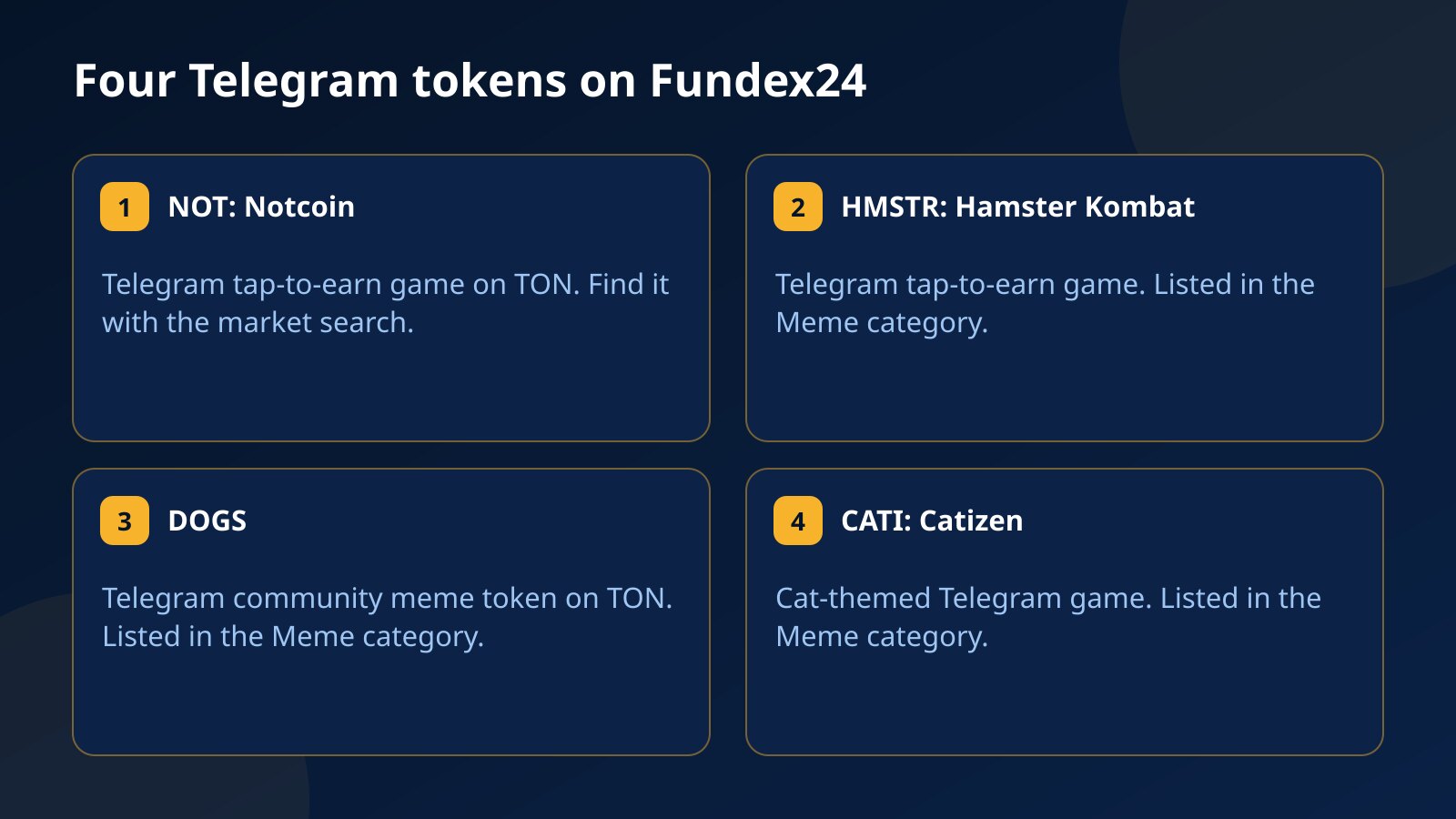
- NOT is the token of Notcoin, a Telegram tap-to-earn game on TON. It has traded as a Binance Futures perpetual since May 2024.
- HMSTR is the token of Hamster Kombat, a Telegram tap-to-earn game, with a Binance Futures perpetual since September 2024.
- DOGS is a Telegram community meme token on TON, on Binance Futures since August 2024.
- CATI is the token of Catizen, a cat-themed Telegram game, on Binance Futures since September 2024.
NOT and DOGS live on TON, but Toncoin (TON) itself is not a market on Fundex24, so the token markets are the way to trade this corner of Telegram.
How to find NOT, HMSTR, DOGS and CATI on Fundex24
HMSTR, DOGS and CATI are in the Meme category of the market list, alongside DOGE and 1000PEPE. You can also open them directly: the HMSTR/USDT trade page, the DOGS/USDT chart and the CATI/USDT market.
For NOT, type NOT into the market search and pick NOTUSDT, or go straight to the NOT/USDT trade page. None of the four has a ticker prefix, so each quote is the price of one token.
How to trade them without risking your own money
You do not need to put savings on these tokens to trade them. You pay a one-time fee in USDT, $29 for a $3,000 account, $59 for $6,000 or $89 for $10,000, and trade that balance. If it goes wrong, the account closes and the fee is gone: it is the most you can lose on that attempt, and it is not refunded.
It is not free, and there are rules. The account is a test in two stages, a 10% profit target and then 8%, with at least 5 trading days in each and no deadline. Throughout, you may not lose 5% of the day’s starting balance or fall 10% below the starting balance, and open losses count, even for a moment.
Pass both stages and you can request a funded account under the same limits, which pays you 80% of the profit you withdraw. Funded accounts at Fundex24 are simulated for evaluation. The costs and the steps to a payout are in what it costs to trade without savings.
A worked example: HMSTR on a $3,000 account
Take the $3,000 account and risk 1%, which is $30, on an HMSTR trade. Because the token trades far less than DOGE, give the stop room: 12% away gives $30 ÷ 12% = $250. A 4% stop would allow a $750 position, but on a thin market that stop sits right where ordinary wicks reach.
Now the limits in dollars. A day starting at $3,000 allows $150 of loss, and the floor is $2,700. A trading day needs a close with at least $7.50 of profit or loss, which on $250 is a 3% move. The stage 1 target is $300, and one trade that makes more than $180 does not count toward it; the $250 position would need a 72% move to cross that line.
Leverage only sets the margin. The $250 position ties up $25 at 1:10, the highest leverage available, and the loss at the stop is $30 whatever leverage you choose.
The same math applies to NOT, DOGS and CATI. If you want several open at once, remember that they tend to move together, so four $30 risks can behave like one $120 bet.
From game player to first trade
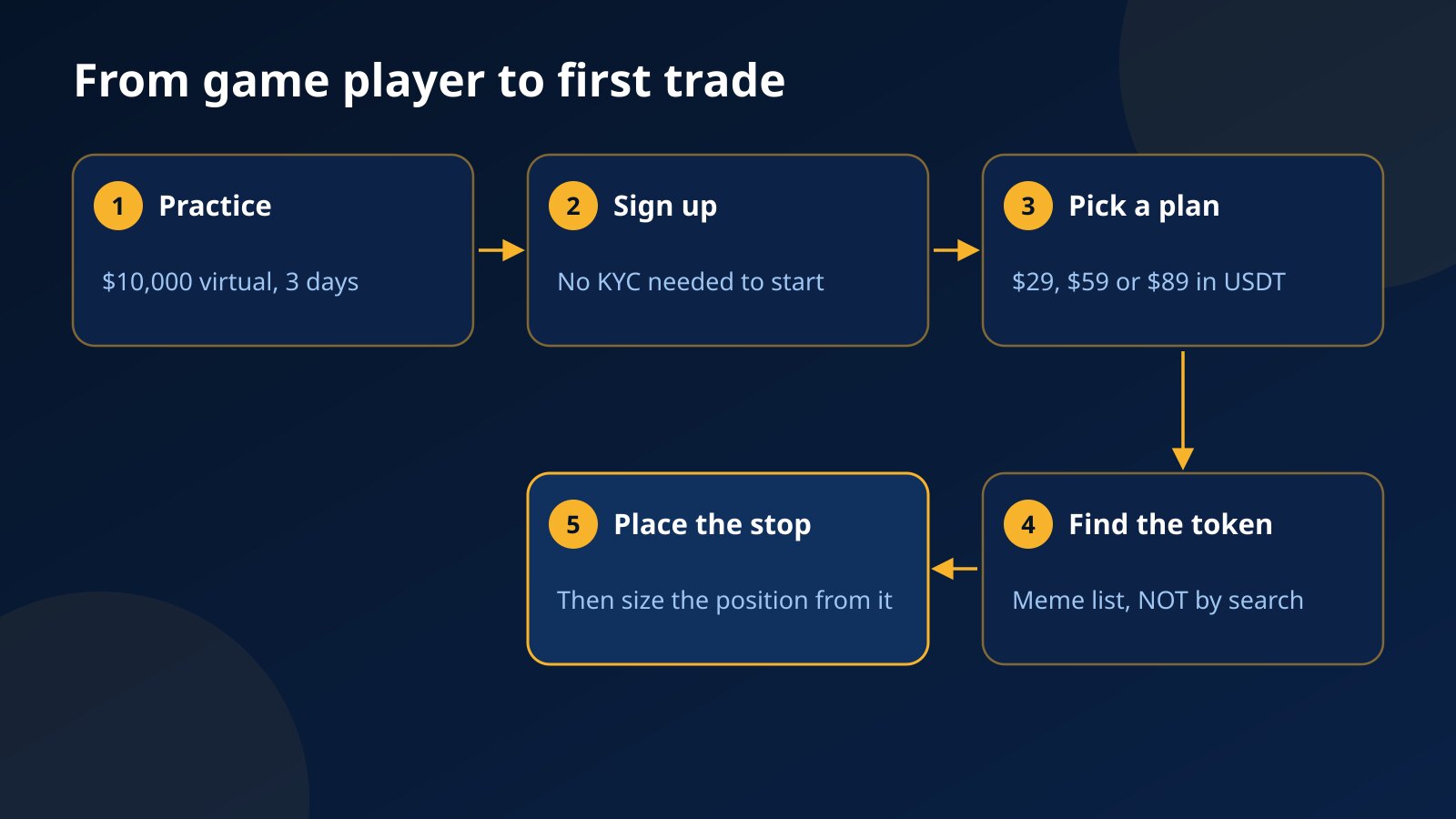
- Open the free practice account: a $10,000 virtual balance for a short run, currently 3 days, with 3 resets in total. Meme coins trade there too.
- When you are ready, create your Fundex24 account; no KYC is needed to start.
- Pick a plan for $29, $59 or $89, pay in USDT on BEP20, TRC20 or ERC20, and open your first trade within 30 days of purchase.
- Find the token: HMSTR, DOGS or CATI in the Meme category, NOT through the market search.
- Decide the stop before you enter, size the position from it, and only then open the trade.
If trading itself is new to you, a beginner’s meme coin trade plan covers stops, sizing and common mistakes. The model where a fee stands in for your savings and passing leads to a funded account is called prop trading, and what the challenge involves explains it in more depth.
Telegram game tokens are highly volatile meme coins, and thin trading can stretch a wick further than you expect. Pay only a fee you can afford to lose; funded accounts are simulated for evaluation, and no earnings are promised.
Pick a challenge and start trading
Two-step evaluation, transparent rules, profit split up to 80%.
Not sure which size fits? Read the rules · Common questions
Frequently asked questions
Can I pay with my Notcoin or Hamster Kombat tokens?
No. The fee is paid in USDT on BEP20, TRC20 or ERC20, and your positions follow the token’s price without any tokens changing hands.
Is Toncoin (TON) tradable on Fundex24?
No, TON is not a market on Fundex24. NOT and DOGS, two tokens that live on TON, are.
Where do I find NOT?
Type NOT into the market search and choose NOTUSDT from the results.
Can I short HMSTR or CATI?
Yes. Every market can be traded long or short, but thinly traded tokens can jump sharply against a short, so set the stop first.
Does trading this way cost anything?
Yes, a one-time fee from $29 for a $3,000 account. It is not refunded if the account closes, and a new attempt means a new fee.
Questions about the Fundex24 challenges?
Open the support chat and ask — the team replies right there.
Chat with supportPrefer to read first? Browse the FAQ · Compare the challenges
Continue your learning path
Move from this article to the next useful action or topic.